I decided that after all this moving of my website from host to host. I’ll just share how I started off my website for under $10, for Malaysians out there it’s basically for approx. RM40, though Malaysians are desperate for some relief on the US Dollar side. I wanna keep this guide as short and streamlined as possible. Okay so let’s start up.
01|Where do I start from?
Okay there’s two main things you need to setup your website. You need to have
Domain, you need to have a domain. That’s not all of it. Currently domains are going very very cheap. You could get a domain name from 1and1 or GoDaddy for less than $1/RM4.07 for a year
Hosting, you need a hosting provider to store/host all of your website content online. We highly recommend namecheap for their excellent affordability and price. Their shared hosting starts for under $10, after slapping a coupon I got mine for something around $7, that too for a whole year!
Total : $8.50~
Note: It is very very important to keep note of the username and password you chose while signing up for your domain and hosting
02|I’ve have both of them, now what?
After you have bought both (the hosting and domain), you need to point your domain to your hosting. Oh okay, well how did I do that?
It’s a pretty simple process, when you’ve purchased your hosting, you will receive an email from the hosting company with the credentials of your hosting. Look for the nameservers in the email that your hosting provider sent you. Most commonly they are a pair of two URLs (or if that’s how do describe it they look sorta like this
I am using FastComet at the moment. Though, I used to use Namecheap earlier. Namecheap is still super great. No complaints.
Okay next up. I need you to keep this email open in the background. Now head over to the website where you got your domain from and login over there with the credential you used while signing up. After logging in, go into the settings of your domain. There you’ll find an option called “Edit DNS” or “Edit Nameservers”. Open it. Insert the nameservers there.
There will be an option in your domain provider’s control panel named “Edit DNS” or Edit Nameservers” You can change your nameservers from there. Then after done, remember to save it!
03| Okay nuchuck! I’ve learnt so much today, I must’ve beat the developers, what’s next?
Okay so what we basically did in the past steps was that you told your domain that your website is being hosted at that hosting provider. For this action to take effect, you’ll have to wait for a few hours until a day, it really varies.
04| Okay I’m up, where’s my website?
You aren’t finished building up your website yet. Now is the time to work on your website. For this guide, we will be installing WordPress. To install WordPress, you have to login into CPanel.
To login into cpanel open “yourdomain.com/cpanel” (replace yourdomain.com with your website url) It’s pretty straight forward.
Now you have to pay the email a visit. Now open up the email you got from your hosting and there you’ll find your login credentials for CPanel. Input the credentials into the CPanel tab you just opened previously.
After logging into Cpanel scroll down and look for WordPress, after you found it, click and open it.
Now you’ll be redirected to this or similar page
Now simply click on Install
Input the necessary information. Oh yeah make sure you remember your password
Now simply click on Install
I guess now you’re on your road and now am on my road. I really hope this guide helps as many people as possible and I am very happy to answer any questions in the comments below. Just hook us up.
Well so we thought to start this new series, having the dope systems around us really don’t get that groovy attention. Today we have an exciting, candylicious and jaw-dropper PC build by EMARQUE. These guys recently started off and they have just exploded into great success for their creative worth and outstanding work.
Emarque believes to “aim to bring the PC enthusiast community further in our Malaysia to the next level which is custom liquid cooling, showing that liquid cooling is not only a game for the rich, but also for those on a budget and would like to learn as well”
Though this isn’t suitable for many pockets. It just really shows off how well they are at their work. They also specialize if you have a lower budget, modding and getting a unique PC isnt expensive, they are trying to make cool PCs as affordable.
Amazing project done in the past month by the Emarque team. True hard work and passion involved.The RESURGENCE build…
We really feel excited to see more for the folks at Emarque. Currently they operate in Malaysia and soon hope to expand into nearby Asian territories. Even if you aren’t from around here. Do toss them a huge thumbs up on their page.
If you have any suggestions for next week. You could head over to the Contact Us page and tell us more about it.
Cooler Master is no stranger in the PC Market when it comes to PC Hardware and peripherals. Cooler Master recently launched a successor to their Devastator lineup.
The keyboard is a mem-chanical keyboard, which Cooler Master claims it to be Mechanical-like switches. With them having their custom switches allows the keyboard to have a longer lifespan and is compatible with Cherry MX Keycaps. Towards the top of the keyboard they have a few dedicated media shortcut keys which are pretty common and a neat addition.
As of the mouse, it comes in three colors, red, green and blue. It has a DPI ranging from 500 to 2000DPI and has a lifecylcle of 10 Million clicks. One thing that is great about the mouse is that it is an ambidextrous mouse, in other words it could be used by left and right-handed users.
The Devastator II Combo is retailing at a fairly good price of RM199. Considering the price tag, you’re getting a good combo with a few minor quirks. Make sure you’re getting the color you want because you can’t change the color later. If you are keen to get this combo, do keep an eye out for this on your favourite retailers and e-retailers.
So Achieva Malaysia invited us to their event which was mainly geared towards server and enterprise solutions. They showed off Intel’s NUC and compute stick which were revised according to previous complaints from other reviewers. Though, we didn’t have a chance to review the previous gen, we are expecting to review these new bad boys which are the ultimate compute war machines when it comes to portability. That wasn’t all, Intel also showed off their new Xeon CPU, of which according to that has made Server solutions more reliable and inexpensive.
The Xeon System
Xeon E5-2600 v5 Presentation
Intel Malaysia also showed off their new E5-2600 v4 which is based around the Broadwell microarchitecture built on 14nm process technology which is still compatible with motherboards that support the E5 2600 v3. It also supports 4 Channels of DDR4 with 40 lans of PCIE 3.0.
As we can see here there is a 6th Gen i5 6260U paired with Intel’s new Iris Graphics 540 and DDR4 RAM with some extra expansion options such as an M.2 slot for a 42mm or even an 80mm M.2 SSD, and one SATA 3 port for a 2.5″ HDD or SSD,
The NUCs were also being shown off, this time instead of the overrated i7 which they used in the last NUC this time around they have opted for a Skylake i5 option only! To me I could I understand that it is quite okay, but I wish they had a bit lower CPU options only as we could understand that the NUC is going to a a treat for homes and in some office environments which involve simple tasks such as emails and in some productivity applications. Anyways, I really don’t mind having an i5, but if there was an i3 variant as well which would allow a lower price tag.
E3 Pro Gaming V5 Presentation
Next up we had Asus at the event too, since the event was more leaned towards the Xeon consumer, Asus showed off their E3 Pro Gaming V5 motherboard. They had quite a lot to brag about using a Xeon as your gaming system while promoting their motherboard being compatible with Intel’s Skylake and Xeons, quite a treat there!
Asus was sure serious about Xeon as your new CPU. Here they were comparing an i7 6700 to a Xeon E3 1230 v5. Sorry for the blocked image.
From here on, Asus was really serious about getting i7 performance for the costs of an i5 CPU if you opted for a Xeon CPU. According to the benchmark they show that there is less a 3% difference in performance between a Xeon E3 1230 v5 and a locked Skylake i7 6700. But here is where I got a question running. What if they compared an i7 6700k OC’ed? Hmmm, that’s one perk. Anyways the point they want to prove to us is the costs of using a Xeon instead of an i7 and the extra cash that you’ll be saving.
The new Compute stick from Intel
The new Intel Compute stick has been revised addressing and fixing the issues that the older compute stick had. This time around according to the complaints such as poor Wireless connectivity and only having one USB 2.0 port this time they fixed these issues around, excellent work there, but that is to be tested.
This time they clearly went a bit thicker, but why should I complain? This time you have one USB 2.0 and one USB 3,0 port, Wi-Fi and Bluetooth connectivity (which has been revised), a microSD card slot and a security notch all running under Intel’s Quad Core Atom x5 processor.
And lastly a huge thanks to Achieva Malaysia for inviting us to their event!
Ok so as you know PC Parts aren’t cheap especially when you are an enthusiast. I am commonly on the search and lookout for the cheapest prices around the market and sometimes when you get your parts you need to make your rig look great! Some newcomers to PC have a hard time finding the right parts and the right prices. Even if you get the right prices, is the seller trusted? Here’s my full guide to kick off your upcoming PC Build!
Optionally, we recommend you to set your budget in mind just that you are sure how much you wanna spend on your PC. So get your budget set and jump in to see and get an idea which parts you need!
01|PLAN YOUR BUILD
There are two ways to plan the parts you need to build your PC:
PCPartPicker: For those who are building their first PC, this is an excellent online site that helps you find compatible parts for your new PC. Head over to PCPartPicker.com now. If you want to save some time check the “Alternative Method” below.
Note: The currency is in USD be sure to convert your budget to MYR before using PCPartPicker.com tool!
Alternative Method: So if you have been building PCs for some time and have the experience you must know how to choose the parts. Just to save some time. Here’s what mainly matters to be compatible:
Make sure your CPU and Motherboard share the same socket (If you chose an LGA1150 CPU then you need a motherboard that has an LGA1150 socket)
Will you use a CPU Cooler? This is one of the most overlooked aspects when building a computer. If you are gonna use a CPU cooler then you may want to buy low profile RAM. Some common low-profile RAMs are Crucial Ballistix and Kingston’s HyperX Fury RAMs. Secondly, make sure that CPU cooler is compatible with the socket on the motherboard.
Make sure you are using the right type of RAM (If your motherboard uses DDR3 RAM then BUY ONLY DDR3 RAM and make sure it is Desktop RAM ONLY! Others won’t work. Capacity and Latency does not matter at all if you are using one stick only. If you are wishing to get 2 modules of RAM! Try to get 2 modules of the exact same RAM just to ease any later issues)
Make sure your Motherboard will fit in your case (Motherboard come in sizes, the standard sizes are M-ATX/ITX and Full ATX so if you are going for a full size or mid-tower case ignore this but if you were going for a small sized case you really need to be careful, make sure it fits into your case)
DON’T SKIMP ON YOUR PSU! CHOOSE YOUR PSU AFTER ALL OTHER PARTS HAVE BEEN CHOSEN- This is one of the biggest overlooked stuff for the first time builder! Ok in Malaysia there is no shortage for awful hardware! You could find a 500W PSU for RM50 but that is not really 500W capable! Get your PSU from a reputable manufacturer only! and make youre you are getting ENOUGHWATTS and ENOUGH AMPS on the 12V rail! I would really recommend consulting any of the retailers listed below as a compulsory step. They give excellent ideas and help you in choosing your PSU.
The rest of the compatibility of the parts doesn’t matter!
02| REVIEWS & OPINIONS
Ok, so the parts you have confirmed are compatible. If you are an experienced builder, you know what you are doing. For the first time builder ask in Forums and on Facebook for opinions.
Try looking for reviews on Youtube and on Google relating exactly to the parts you are buying. This helps you know the strengths and weakness of the parts you are buying.
They all provide excellent reviews. If you wanna save the hassle of looking over each site! GOOGLE IT!
03| SPEND WISELY
So buying parts in Malaysia for the first time builder isn’t such a good of an experience. Don’t just go out to the shops or even Lowyat Plaza to get your parts. Sellers would say any type of lie just to sell their products.
Online Shopping- As a compulsory step I look for the lowest prices! Go online and do research for the prices of each product on Lelong.com.my. This has the most updated and lowest prices because of the competition so this is the best place to start off!
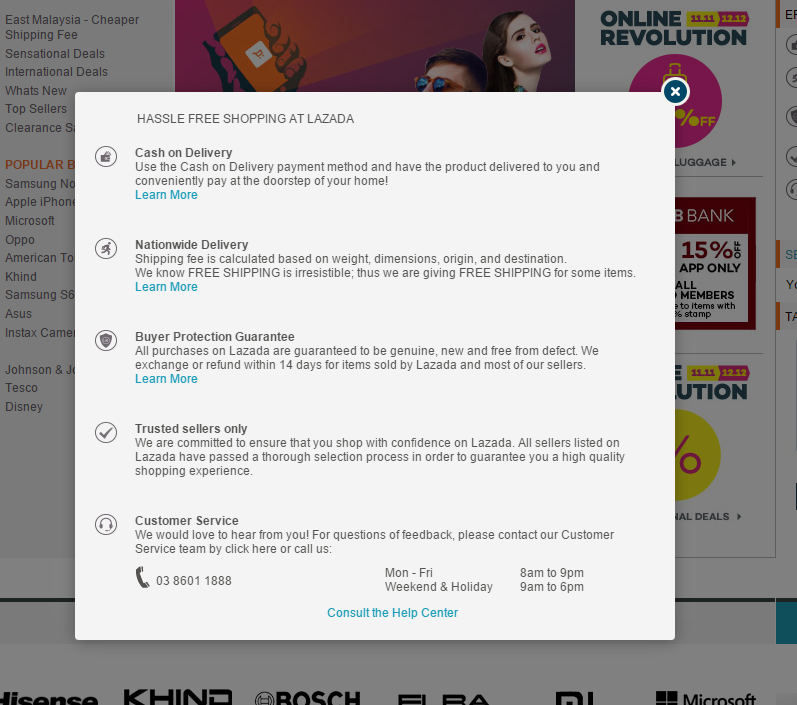
After you got the lowest prices you really need to head over to www.Lazada.com.my they are an excellent all-rounded site with PC Hardware included. They provide a lot of coupons. Try to find coupons on their mobile app or their desktop site. Use their coupons and you’ll surely save a lot of money! They also are trusted and also have the option for COD and have the option of 14 days return back which is unbeatable even when you have opened the product with RM0 or a low shipping fee.
If you wanna go yourself or need some extra facilities there are very excellent PC Hardware Shops out there! Some of my own personal suggestions are:
TMT Online/ThunderMatch Technology
TechView IT Solutions
Some other highly recommended retailers in Malaysia:
Jayacom
Ideal Tech PC Sdn.Bhd (These guys have the best service and goodies)
APES.my
DotaTech IT Enterprise
In my opinion, these are the best PC Shops with the best service and guidance with unbeatable prices!
—————————————
04| PIMP YOUR RIG!
Ok so you built that kicker and now it’s running, what happens if you got such an awesome PC but no aesthetics? Well thankfully this large community of PC Enthusiasm has brought many ways to pimp up your rig!
LED Strips- The cheapest way to pimp some lighting into or even under your PC.
Cable Sleeving- Now you’re talking about modding and a clean PC! This my personal preference to do. Even though its a bit more costly than LED Strips
Paint- Geek out! This is where you repaint either the whole case or paint some areas of your case giving it a whole new look. There is also a paint called Plastidip which is an excellent type of paint which could be removed easily if you’re bored with the color.
Stickers- Well there is no shortage of stickers out there! You could pick up stickers from almost anywhere and pimp it up to your taste and are the most cost-effective way to give some shine to that new rig of yours.
This list is endless! just as the endless possibilities a PC does have!
Ok Usman, so where do I get these modding goodies?
Revoluzion Technologia- Simply excellent and unbeatable! with a return rate of 0% and while providing a staggering 3 years of warranty! They provide cable sleevings for your PSU to give you that awesome clean look! WE EXPECT TO REVIEW THEIR CABLES SOON!
Lelong.my- This is where you’ll find almost anything. Dive in and check out what could you get
Emarque – These guys are the all in one place for your pimping. Damn these guys are awesome PC modders, they have the cable sleevings and everything to make your rig unique!
———————————————
Attention Tips!
We know anyone could pick up parts. But some people buy new parts, while some people would opt for used parts Whether you get new or used hardware make sure of these tips below:
Every single part you buy, new or used, make sure the seller gives you the receipt.
To stay out of risk, opt for a product that is under warranty!
Don’t be fooled by the word “warranty”, since not every problem is covered under warranty, which is the main reason I opt for new parts. If you are going to buy used parts, make sure the seller is giving you a personal warranty as well!
DON’T SKIMP ON YOUR PSU, Try to get a good brand PSU and please consult any retailer above. KCAS is a good PSU in my eyes, I personally use it and is one of the cheapest options out there! I have used the 600W one with a 280x paired with an FX 6300 in the past.
CASH ON DELIVERY IS KEY FOR USED PARTS: If you are buying any product offline but need shipping for the product, never ever Bank-in/transfer the money first!
I hope that was all the information I could provide! It did take me time and I wish this helps everyone and people. And please try to improve us. We aren’t ashamed!
So as some of you may know that I am an Intel CPU user and an AMD GPU user. Recently there is a lot of blunder around the new upcoming AMD Zen CPUs which promise to catch up with Intel’s rally of CPU. I was on the same hunt of looking for any news about AMD’s Zen since I have a soft spot for it too.
01| AMD Zen is very important for AMD
I wasn’t able to find anything major on Google so I stumbled upon an excellent video on Youtube that really caught my attention. I am no historian, but I found alot of his points that he made are valid. Here’s his video!
For those who are bragging he’s an AMD fanboy, go along with the video and listen carefully as the uploader of this video is an i5 2500k user. There’s many valid arguments that he makes over here. AMD is already in a financial crisis. They need Zen!
02| DX12 Performance improvements
As we could see, DX12 seems to love more cores and less GHz. I also found Digital Foundry’s video on which the benchmarks the i3 4130 and i7 4790k on DX11 and DX12. As we could see that DX11 used to heavily rely on the 1st core of the CPU or so call it CPU0.
There is one more user that uploaded his video about the use of his cores on his AMD FX8350, as you could see from the test how evenly the usage of cores are. By the results we have seen so far it seems AMD’s many core strategy is finally working out by finally utilizing all the cores on the AMD FX CPUs very efficiently thanks to DX12. As of those who don’t believe on the AMD 8 Core rant could have a look at the demonstration below which confirms all the 8 cores finally being utilized in 3DMark’s API tests of DX11 vs DX12.
Meanwhile, up to a business standpoint it really seems like DX12 would not do major boost to the AMD FX lineup. They also need their business running and need users to upgrade to their AM4 lineup. If there will be a major boost on the current AMD FX lineup let’s see how AMD handles this.
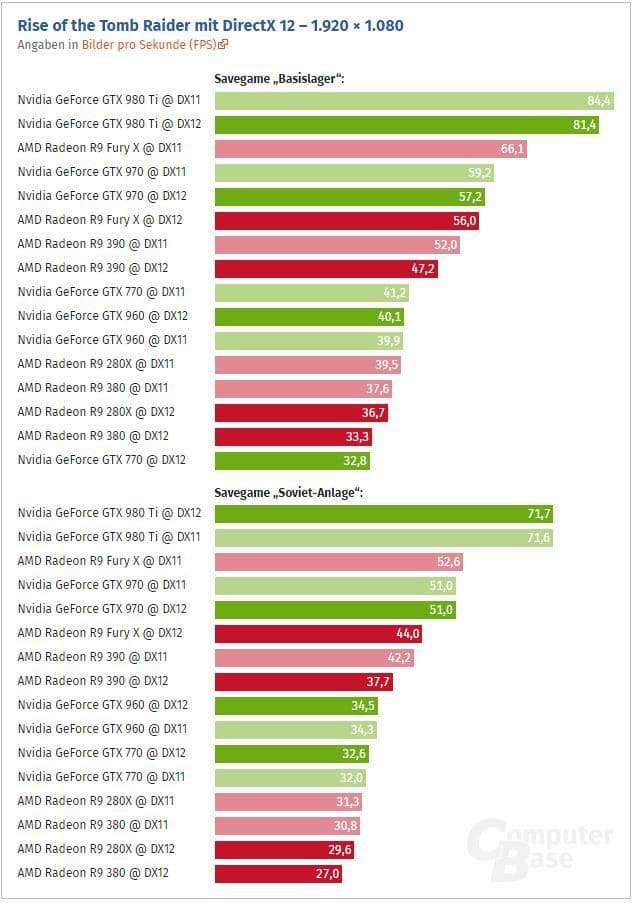
Here are a few benchmarks of games that are already utilizing the DirectX12 API
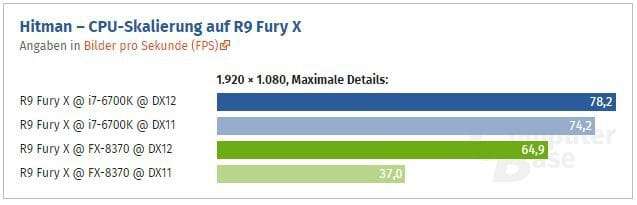
i7 6700k vs FX 8370 Hitman on a FuryX. Not a property of GeeksULTD
Not a property of GeeksULTD
I honestly am not expecting any major gains towards the AMD FX CPU’s side after utilizing the DX12 API but sure am very interested in the gains that Hitman has on the AMD FX 8370. Still intel is ahead at the meonet and we are excited to see if AMD plains the field! As we could see some modest gains on the AMD FX side especially the 8 cores.
So what are your thoughts? Are you happy with your FX CPU? Or do you have some thoughts? The comments section is down below!
The big news of the day is Microsoft is making XBOX Live online play cross platform. Why is it big news? First of all, it’s a part of the slippery slope that seems to be happening at Microsoft recently where Microsoft seems to be transitioning its focus to PC Gaming with the announcement of Quantum Break’s for PC. Although that news didn’t seem to sit well with Xbox fans, cross play between gaming mediums should be receive a warm welcome. Gamers have mostly been separated by online play due to console makers restricting their ecosystem. This meant that if your friend had a different console than yours, you wouldn’t be able to play with them- imagine owning the Xbox One when all your friends play on the PS4.
“First, in addition to natively supporting cross-platform play between Xbox One and Windows 10 games that use Xbox Live, we’re enabling developers to support cross-network play as well. This means players on Xbox One and Windows 10 using Xbox Live will be able to play with players on different online multiplayer networks – including other console and PC networks.Of course, it’s up to game developers to support this feature, and Xbox Live players will always have the option of choosing to play only with other Xbox Live
players. We’re thrilled to confirm that Psyonix’s Rocket League will be one of the first games to take advantage of this new capability by enabling cross-network play between Xbox One and PC players, with an open invitation for other networks to participate as well.”
As of now, Rocket League is the only game that supports this feature though. It’s hard to say right now how widespread this feature will be adopted. I can see the consoles and PC adopting this feature in Rocket League, however in other more competitive shooter games it’s obvious that the PC will have an unfair advantage. Having that said, this feature will be left in the dust if the other console and game devs don’t take advantage of it. Let’s hope this trend continues going forward.
Sapphire is no stranger in the GPU market.They have been manufacturing AMD GPUs for years now and have earned alot of praise for their cards and pricing. Today we have their Nitro R9 390 which seems neck and neck with PowerColor’s R9 390, in terms of pricing. More accurately at the time of this review, this graphics card is priced at US $340 on Newegg USA, while on Malaysia it costs RM1525 on Lelong.com.my.
So how does Sapphire’s R9 390 stack up against its competition?
01|The Unboxing!
In the box, there’s a user manual, driver CD, an HDMI cable and the graphics card itself.
02| The Design and Build
Just a simple design aesthtically. not a fan.
The design of this card is just okay. After using PowerColor’s R9 390, which I reviewed earlier, I wan’t expecting much of a difference between the two cards. The Sapphire Nitro R9 390 doesn’t show off any aesthetics in their R9 390 model. They are sticking to a Grey/Silver and Black build with the R9 300 series of cards and the same continues here as well.
Pretty decent options!
For the display output options you have 3 x Display Ports, a single HDMI and DVI port, which is just okay for today’s standards.
No backplate here! Sorry
Coming towards the back of the card is where I am highly disappointed of! Come on Sapphire how much did you save by doing this? Okay I must admit yes, its not that ugly but what rages me is why not on a high end card? I know they have a rev. 2.0 of this card which has a backplate and seems to be only available in the States, but why not included it in the first place. I’d really give PowerColor’s R9 390 a cookie for adding a backplate, despite it being the most inexpensive R9 390 in Malaysia. Enough Rant!
Just plain, nothing here!
Having a look towards the right of the graphics card is just plain, nothing much
Suprisingly, this graphics card requires 8+8 pin to power up, while the majority of R9 390 cards are sticking to 6+8pin
Here are the idle and 100% load temperatures. I must compliment the fans. Yes they fully shut off under low loads. When a game is run it ramps up the fans which is pretty common in most graphics cards found today. Even though, its good to have it there. One thing I did notice that after exiting heavy loads such s games or Furmark, the fans ramped down from around 75 degrees to around 60% in almost 2 seconds which is fast, at least for me.
Enough talk, here’s the cards idle and 100% full load temps.
The pricing of this card is competitive. If you are that person who has a lower budget but are stretching towards this budget forcefully, pretty much like me, I would recommend you to get the Powercolor R9 390. The card outperforms the GTX 970 in alot of cases. However, not everything is positive here, as usual expect high power consumption, and I must point out that the noise not that good as well. there’s no doubt that this card deserves its place in the market as well. Its just that there are better options that cover up Sapphire’s Nitro R9 390.
Pros:
Among the most inexpensive R9 390’s
Triple Fan cooling
Solid Build Quality
Excellent Performance
8GB of VRAM
Cons:
No backplate
High power consumption
Noise output
We would like to award this product our Bronze Award!
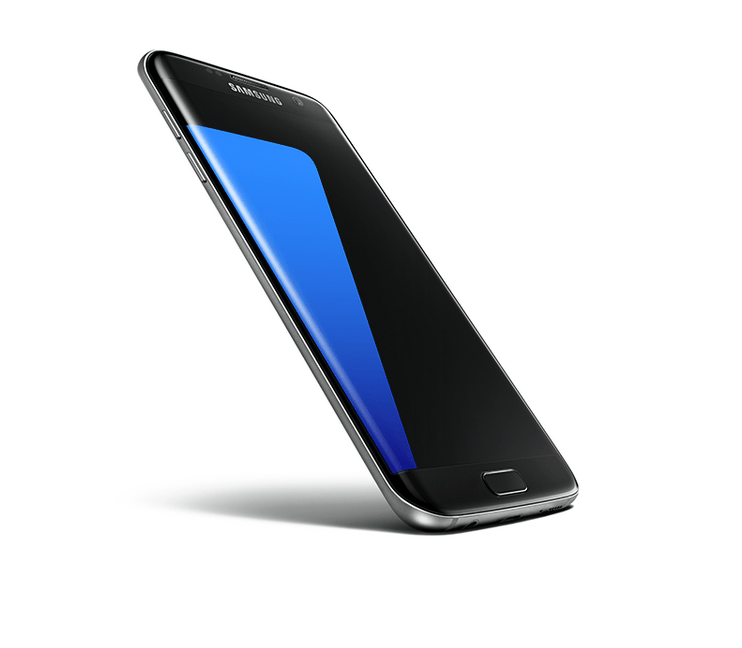
The Galaxy S7 and S7 edge are finally out. Although we haven’t gotten ourselves one to review this article will be our thoughts about the phone so far.
The hardware design
It looks like Samsung’s move to premium feel in their flagship devices is to stay. We’re happy to see a refined body on the S7 and S7 edge compared to past iterations and although its classy style was seen in the S6 and S6 edge- the now sleek metro design will integrate more naturally into your professional life. None of that plastic fantastic mess commonly associated with the low baller. It’s a design that demands to be taken seriously- which is a huge step up when looking back at previous designs before the S6. Not only that we’re happy to get the MicroSD slot back and getting a bigger battery.
The software design
Samsung has moved away from TouchWiz but don’t expect to see a whole new concept in its skinning. Old habits die hard and Samsung certain have hard to kill habits in them. Bloatware still seems to plague the phone’s software but admittedly not as bad as when Samsung initially started with TouchWiz.
For now, this is all we can provide you on our initial thoughts on the S7 and S7 edge. We can’t comment further without actually using the device. However, looking at other sites that are reporting on it. It looks like Samsung has gotten another great competitor on its hands.
Large phones don’t come around the corner everyday, especially by the big names. By large phones we mean “Phablets”
I’ve been usingToday we got our hands on Asus’s Zenfone 2 Laser which has that dope large 6″ inch Full HD 1080p screen, packed with 3GB of RAM and 32GB of internal storage. More specifically, the phone’s model is ZE601KL if you want to find this exact phone out in the wild! Let’s see is the bigger screen hype on a budget worth it? Let’s find out!
01| The Unboxing/Showoff
I usually am not a fan of boxes but I must say Zenfone boxes sure catch my attention. To be honest, I can’t judge the phone just for its box.
Well, you get everything you need in the box, the phone, a charger, Micro-USB cable, an earphone, three serial stickers (pretty handy I guess) and some extra earbuds to spare. One thing I was let down was the absence of Asus’s Quick charger.
02| Design & Build Quality
The design of the Zenfone 2 isn’t anything fancy. It carries the same traditional Asus design elements and weight, which doesn’t feel bad at all.
On the top, there’s a power button and a headphone jack.
On the rear, there’s a 13MP shooter with dual LED flash and laser auto-focus along with the volume rocker and dual speakers at the bottom rear.
One the bottom, there’s a Micro-USB charging port only.
Towards the front of the device, you’ll find the 5MP selfie cam, the so-obvious large 6″ inch display, earpiece, touch-capacitive buttons and finally Asus’s signature chin.
The phone sure seems to show about Asus’s plans to focus more on ergonomics of their devices. The ackward position of the power button could be forgiven. I didn’t miss the power button for most of the time since Asus has implemented the “Double-tap to wake feature on their Zenfone lineup which is a life saver.
The build quality of the phone seems to be good. I haven’t noticed anything that I could complain about. One thing I must bring into note is that the device is not made of metal, its plastic but that’s not all bad here. You get access to alot of goodies here such as, dual sim cards, MicroSD Card slot and your classic user-replaceable battery.
03| Display & Speakers
So the Asus Zenfone 2 Laser (ZE601KL) sports a 1920 x 1080 display at a pixel density of 367PPI, covered with Corning Gorilla Glass 4. Coming from the Asus Zenfone 2 ZE550ML with a 720p display, I sure was able to tell the difference. The screen was cleaerer on the ZE601KL side and I really loved to have a fact that I was using a large screen. The real estate is just great on this phone.
At first boot-up the display looked dull, but Asus has included an app called “Splendid” which tweaks the screen to your liking. After setting up the screen to my liking, the screen was gorgeous. I am a huge fan of having the ability to tweak my screen to full fill my taste. I just went out crazy, I chose the customized mode in the Splendid app (which you can access in the Display Settings too), maxed out the Saturation bar, kept the color temperature neutral and set the brightness to 100% and turned off the auto mode. This revamped my expectations to watch more content on this device.
When it comes to the brightness of the screen I could say it done s a fine job. Its okay but not bright enough outdoors and its pretty good indoors.
Watching media on this device was great. The large screen is a delightful catch to many especially for media consumers becuase 6 inchers aren’t released so often especially from manufacturers like Asus and others.
Another great catch for media consumers about this phone is the dual speakers. I really like them. It sure is loud but it sure isn’t the best even when comparing it to my old Asus ZE550ML I really prefer the sound quality there. However, if it weren’t to compare it I just loved the speakers.
04|Performance & UI
Asus’s ZenUI plays well with Lollipop. Out of the box, it comes pre-installed with Android 5.0.2 Lollipop with the ZenUI being the star of their show. According to our meeting with Asus they claim that the ZE601KL/this device is going to recive Android 6.0 Marshmallow by Q2, 2016.
Coming back to the review, I really like how Asus has implemented Zen UI on top of lollipop. Sure the current sweet OS is Android Lollipop, but the bloatware on this phone is simply unnecessary. I literally don’t like the extra apps that Asus has included, they are of no use to me. Thankfully, they are uninstallable, but what’s the use of pre-installing them in the first place? is my question to most manufacturers, if the consumer needs something thankfully Play Store is there. I’d really love to see zero bloatware on devices such as this Asus Zenfone lineup and many more.
As of the Zen UI, the RAM management is good, After having all your favourite apps in the background I still have 500-600MB left otherwise expect to see 900MB-1GB always available.Resuming apps that were used yesterday or even before that resumed as if I never left them thanks to the 3GB RAM. But literally, excluding stock Android and Cyanogenmod, I think Zen UI is “Lollipop done right. Yes Zen UI is the best non-stock Android or whatever you want to call it, but my personal view to all manufacturers is… Yes I do undertsand manufacturers that depend on Andoird use their own custom UI to add their cherry signature on top but please get rid of the bloatware. The best example I can remember is a Samsung and HTC’s Google Play edition phones implemented on their S4 and One M8. That’s what I really love to see from Asus as a separate cherry on top and I think they can nail it!
However, there are some reasons why I don’t install a custom launcher on my Asus phones. First of all, the customization, it has everything you need from the ordinary wallpapers for your home and lock screen to, fonts, icon packs, scroll effects, and much more! The second reason why I love the Zen UI is the way how it resembles close to Stock Android Lollipop.
As of the performance, thankfully we Asus went with the Snapdragon 616 as their CPU, well im not thanking becuase of their surely there are better CPU’s out there but the thanks is becuase of avoiding the Snapdragon 615 which received a ton of bad reviews for overheating even at simple tasks. KUDOS to Asus on that too! I can say the phone doesn’t heat up on any normal tasks. However, I found it to slightly warm up when playing games for quite a while.
Anyways, speaking of gaming. The phone handles high-demanding games very well when you set the battery mode to “High Performance” in the Power Saver app. I tested Real Racing 3 which sure is a taxing game for many budget devices out there and it played very well I didn’t really notice any lags. However, if you’re looking for some Candy Crush frenzy, this phone handles it like a boss(Of course)!
05|Camera
The Ze601KL has a 13MP camera with laser autofocus.The camera just didn’t impress me. It just got the job done. Noise in images are evident most of the time. However, tapping into the full manual mode did aid things up a bit. Still, the majority of users want to just simply tap and shoot and dont want to mess around with the camera’s manual mode. Here are some pictures you can have a look yourself at!
06| Connectivity and Battery life
The connectivity on this phone is pretty good. I don’t have a huge house but even at the far end of my house it gets pretty good signals from about 18 feet away with obstruction from walls present. I tested the Wifi in the farthest room and out of 30Mbps I got usable results. Out of 30Mbps I got 16Mbps Down and 11Mbps up which I know can be improved if I was a bit closer.
Second up, the battery life. Its okay. Its a media consumption device and why wouldn’t it have a decent battery? I must say that under Medium usage with 100% brightness all the time with my wifi connected it managed to get me through a day,
If you’re heavily on Youtube, it would get you from 2 and 1/2 hours to 3 hours which is quite good. One thing I would really like Asus to implement is a simple toggle to switch between Power Saving and High Performance mode.
07|Verdict!
I must say the phone is excellent for those who are media consumers. I really love the 6 inch screen and the battery life fair well too. I really could ask for more but for now its decent and could be improved, of course. However, I’m pretty cheesy on the camera, the camera is good and the auto focus is super fast that’s for sure. But the Tap tap Focus takes time, which is a bummer. I liked the way that the phone held up the heat. But coming at a price of RM1099 which is approximately USD $265, there’s sure tough competition around it!
I’d like to award Asus’s Zenfone 2 (ZE601KL) our Silver Award! Oh man! we always have to type the exact model number, Please ASUS could you work on the name scheme? Anyways, a great phone! And yeah, thanks to Asus Malaysia for providing us the review unit which made this review possible.
We would like to award this product our Silver Award!
The Prolink Fuscus Gaming Mouse is an inexpensive mouse that wants the space on your desk. At the time of this review its price tag hovering around the RM30/USD$6.50 mark. It features some cool nicks and a few drawbacks, as usual. The mouse seems to be concentrating towards the average consumer who just burnt a hole in his pocket. So is shoving another RM30~, worth it? Let’s find out!
01| The Unboxing/Showoff
Well the box was pretty much straight-forward, nothing much! You just get a user manual which just labels the different areas of the mouse and you get the mouse itself.
The showoff!
02| Design
There’s four buttons on the top, the left click and right-click buttons, scroll wheel and the DPI adjustment button.
Coming to the design of the mouse is just good in my opinion, I can’t say that its great. The mouse seems well built at the same times some areas really seem to show up where they cut down their costs. The mouse seems to fit in my hand very well. I also really like the way how my hand resets onto it, except that I missed the rubber grips. The mouse has a matte finish on the top with some LED glowing working in there. It really seems to come together in my opinion.
The right side of the mouse is plain. Coming to the left side of the mouse you’ll find the forward and backward buttons which are excellently placed.
And lastly towards the bottom you’ll find two four pads, the S/N (a neat addition), and the usual optical sensor.
For aesthetics, there’s a 7-color breathing LED backlit system for the geeks who just want that dope look. The minor downsides which I really felt were the LED lighting not reaching the scroll wheel and not having the option to lock the color you like.
03| Build Quality
The build quality in my opinion is just decent. I have been using this mouse for a week now and the mouse sure has some quirks. The forward and backward feel flimsy. The same story continues with the buttons on top of the mouse, more specifically, the DPI button and the left & right-click buttons. I also missed the addition of some use of rubber onto the sides of the mouse which was a bit disappointing. Looks like Prolink really had to cut down costs over here.
However, I can say the cable as promised on the box felt strong, it seems like they put some work into it, even though I don’t really care about it. The same story continues with the USB connector it isn’t the best in the world but sure feels like a solid addition. Kudos to Prolink!
04| User Experience
The user experience with this mouse was Okay. I have a few complaints for it such as the loud right and left-clicks and the color breathing may be great for many, but it isn’t the best for me.
I’ve been using the mouse with Xiaomi’s Mouse Pad this week. However, when it comes to gaming, even FPS games, I really loved the mouse. I really never felt any lag. The mouse glides smoothly and the mouse really seemed pleasant to use. I am really comfortable with the 800DPI
05| Pricing/Conclusion
For RM28, I really can’t complain about this mouse. I must say I sure am satisfied with the day to day usage. The only cut down I can see is the quality of the mouse. The mouse will do ever task like ever other mouse but as I said it has a cut down in its quality. I really would have appreciated an RM50 mouse with better LED options, better gripping and better quality. But in the end the price is dead low and due to it being so light, its easily portable.
Thank you to Prolink for providing me a sample of their Fuscus Gaming Mouse to review!
We would like to award this product our Bronze Award!
Today, I got my hands on a keyboard that may attract many gamers, due to its design and it’s cost which is under RM75 or USD 17~. So the keyboard looks awesome is aiming to get that spot on your desk. Is it worthy? Let’s find out!
01|The SHOWOFF & UNBOXING!
Well…. the box speaks for itself.
Next up. what was interesting but not fancy, was Armaggeddon offering 2 years of warranty for the keyboard. I have seen a lot of manufacturers offering 1 year warranty on their keyboards.
There’s nothing much we could talk about over here! Just the Keyboard itself and a CD
02| Design
Of course it’s a gaming keyboard. The keyboard looks great in my opinion. I have the blue backlight AK550i, anyways there’s a red variant of it too. The keyboards design looks great and there’s some final touches to the design which I really like, such as the “Scroll”, “Num” and “Caps” lock being visible enough which is great to have!”Kudos” to Armageddon extending the lighting to the sides of the keyboard which which is a nice finishing touch to the design.
The layout of the keyboard is good, but not great.I have a complaint with the layout of the keys on the keyboard I am not a fan of having a large “Enter” button and shifting the “” and the “Backspace” key to the top. I know this is a personal preference, but this may be a deal breaker for some too. One more thing that felt off was the placement of the Volume Keys, but it didn’t long for them to grow on me.
The backlit lighting works well, I can’t really spot any dead areas where the lighting can’t reach. The typography or fonts used on the keys of the keyboard are good. As it wants to look a bit futuristic, the fonts looked a bit weird at first, anyways that grew on me too and I really like them now. Coming to the top, you have all the necessary and shortcut keys which really saves a hassle.
At the bottom, you’ll find two rubber pads, your warranty sticker, a nice addition. and some holes which I believe works as a drainage system for spills. You’ll find there are fairly wide rubber pads beneath, they provide enough grip. I really wish that it had 4 rubber pads on all of the sides since not everyone uses the stands. The stands on the keybaord feel very cheap and are very thin which always forces me to keep in mind how flimsy they are.
03|User Experience/Quality
The keyboard works well with my red and blue setup
The user experience with the Armageddon is good, but I wasn’t delighted with it. It has some quirks that really disturb me. Just to start off, I really I hate both of the “Shift” and the large “Enter” keys. They are noisy and sound like rattles. The space bar isn’t ideal too. The point here isn’t about asking for anything premium on this keyboard, but is the inconsistency of of sounds when pressing these keys. It’s really sad to see that Armaggeddon didn’t look onto this issue, at least that’s what it seems like on my unit. Well, to be honest, the keyboard isn’t that bad overall except for those keys.
Gaming with the keyboard was pretty good I didn’t notice any lag while playing some FPS games. So far I’ve played COD AW and Battlefield 4 they’re pretty good, so there’s nothing to complain about over here.
04|Pricing
Priced at RM75 (USD 17), the Armaggeddon makes a pretty good and compelling option for many. Sure, it has a few quirks but still proves to be an good keyboard for the price. If you’re out these with holes in your pocket and need an upgrade or replacement with some cool looks, this may be an option for you.
We would like to award the Armaggeddon AK550i our Bronze Award!
So I recently picked up a Xiaomi mousepad from Lelong.my for RM7.90, seems good? Yeah sure the price is cheesy, but should you want to give it a chance? Let’s find out!
These are the designs available
01| Design and Quality
What I really love is the numerous design and patterns available from Xiaomi there’s alot of options out there. In my case, I got another design instead of what I ordered for. Just to confirm with you guys that this design which I ordered from lelong isn’t officially for Malaysia, instead it was intended for China which may be the reason I got it for RM7.90. According to my measurement the mousepad seems big enough. The dimensions are 29.5cm x 24.5cm and I believe the thickness is 3mm.
The design of the fabric on top seems to be silk-like. It has a bit of shine to it which I really liked. However, I noticed the finishing on the sides weren’t ideal, at least on my mousepad. Moreover, pushing the fabric up very gently starts it to curl but the top fabric does not come off, that’s for sure!
02|User Experience
The experience with this mousepad was great, nothing fancy, but I had no problem with it either. While working on my Powercolor R9 390 review I used the mouse a lot. I did a lot of gaming with it too! I really loved how my mouse glided over the mousepad in gaming. One thing that may not be a complaint to some is that when ever i moved the mousepad, the mousepad goes long with it too it slightly moves away. Anyway, that doesn’t seem to be a major issue at all.
This image is not my property
03|Price
The pricing of this mousepad is very very attractive for RM10 you’re getting a mouse from a reputable brand with a few minor quirks. If you just need a mousepad. This must be your first choice.
Today we got our hands on Powercolor’s R9 390. This is the cheapest R9 390 you could get for under RM1500. Despite it being the most inexpensive R9 390, you’re getting a beautiful card with triple fans and that awesome backplate that isn’t just for aesthetics.
As of the output options there’s nothing fancy here. There’s 1 x Displayport, 1 x HDMI and 2 x DVI ports.
However, I really want to mention that the backplate is great and doesn’t trap heat.
Nothing fancy here as well. Just some branding and power connectors. To juice up this card you’ll need a 6 pin and an 8 pin connector. Below you’ll find the GPU-Z of the card.
>>TEST SYSTEM
>Benchmarks UNIGINE Heaven 4.0 All of the options are maxed out!
>>Temperatures Here are the idle and 100% load temperatures. I must compliment the fans. Yes they fully shut off under low loads. When a game is run it ramps up the fans which is pretty common in most graphics cards found today. Even though, its good to have it there. One thing I did notice that after exiting heavy loads such s games or Furmark, the fans ramped down from around 75 degrees to around 60% in almost 2 seconds which is fast, at least for me. Enough talk, here’s the cards idle and 100% full load temps.
So Lazada wants to become the Amazon for South East Asia? Is Lazada really sure they could do this? As far as I see it, yes they are capable of dominating the online market. Here’s some Wiki I found!
“Lazada Group is a privately owned e-commerce company headquartered in Singapore that was founded by Rocket Internet in 2011 with the goal of being “the Amazon.com of Southeast Asia.” As of 2014, Lazada Group operated sites in Indonesia, Malaysia, the Philippines, Singapore, Thailand and Vietnam and had raised approximately US$647 million over several investment rounds. In 2014 Lazada’s net operating losses were $152.5 million on net revenues of $154.3 million; however the percentage of its losses relative to its Gross Merchandise Volume (GMV) was smaller in 2014 than in 2013 due to growth in its GMV from $95 million to $384 million.
Its sites launched in March 2012, with a business model of selling inventory to customers from its own warehouses. In 2013 it added a marketplace model that allowed third-party retailers to sell their products through Lazada’s site; the marketplace accounted for 65% of its sales by the end of 2014.“
NOTE: Even though this article is towards the satisfaction of a customer, this article is not sponsored by Lazada in any form. I have experienced Lazada both as a seller and a customer. Which brings me the idea of sharing the ups and downs from Lazada.
01| Design & Content
I’d break this down into two categories, first the Navigation and second, the ease of finding what you’re looking for.
Navigation on Lazada is a pleasant clean experience and destroys the competition websites in the design department. Categories are well arranged, and I do like the idea for them showing off floors as categories. Lazada’s homepage gives you that feeling that now you’re in a realm of good high-quality products than a knock-off. The point isn’t calling other websites a knockoff, but it’s just to show a user’s first impressions on Lazada’s site.
Searching on Lazada, it’s a real disappointment to say that searching on Lazada is a pretty tricky task to do! For an example, go and search for “Full HD monitor” or something that doesn’t have a model of something and you’ll end up scratching your head.
Filtering stuff to find what you want is a good option to have but doesn’t always work as fortunate. You can narrow down a product by setting a brand, price limits and some more options specific for some categories. The problem isn’t the filtering, but it’s that sellers other than Lazada that don’t accurately describe the attributes of the product they are trying to sell. The way how Lazada works with 3rd Party sellers is by reviewing the new product by the 3rd party seller, if approved it’ll appear onto Lazada’s site otherwise will be rejected.
Always choose COD when you can! it’s been many times when 3rd Party sellers are unresponsible and don’t update their stock inventory is what I hate! Just to be free of any issues, I do prefer the option of COD when possible. If your order is cancelled by any means, you’ll be worry free of Lazada returning your money.
Content on Lazada needs further checking and more information should be added when needed. Lazada’s Quality Control should also look up the product details before approving a product if possible.
Lazada isn’t as bad as the sentences above are, actually yes it is the best online marketplace Malaysia may have. I guess in my opinion the main problems on Lazada arise from the 3rd Party Sellers. I just wish Lazada improves on some core factors which will make it the ultimate Online Marketplace. I also do wish for Lazada to force 3rd Party sellers to update their inventory every week or two.
02| Pricing
In my opinion, pricing is good on Lazada. They may seem a bit high compared to other websites or local shops. But you need to realise there are coupons available on Lazada, you just need to find them. For an example, some products such as the RAM above can be taken as an example. Apply a coupon and you’ll beat the competition in most cases. Some people may ask, “Why are the prices shown high in the first place? Is it because Lazada is giving us a coupon?” The answer is “NO”. Lazada charges 3rd party sellers for every single order by a percentage (ranging from 2% to 15%) and also charging the merchant for shipping for the 1st kg which is the reason you would have to pay a low shipping fee or no shipping at all.
So the conclusion for this is, Lazada beats the competition if you find a deal or a coupon. Which is always available around Lazada which is the reason I buy almost all my parts for my PC from there. Lazada won’t always show you coupons. You just need to find them.
03|Payment Options
Lazada has a lot of Payment options which is what I love. They offer credit/debit card option, COD, Paypal, Online Banking and “Credit Card on Delivery”??
04| Shipping time
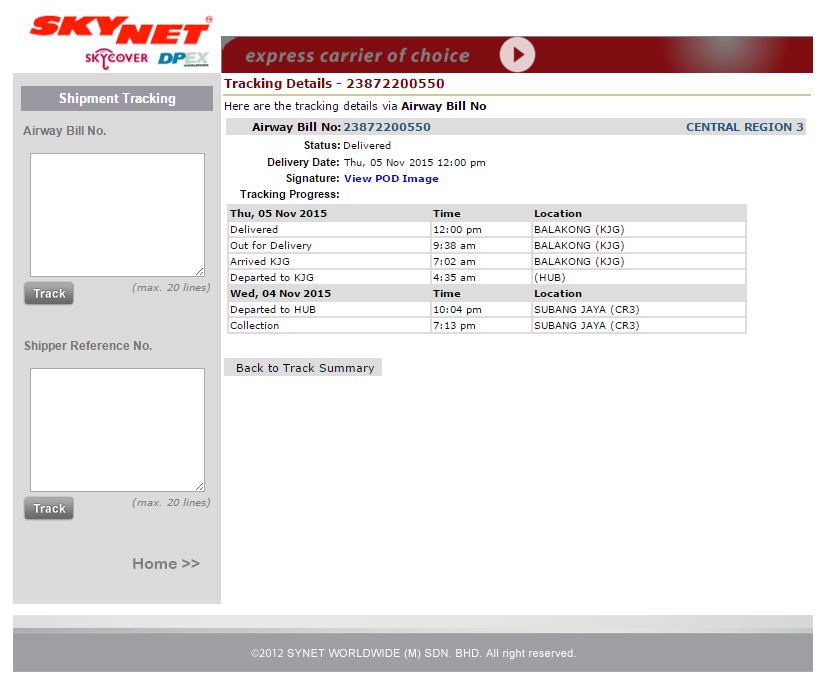
So shipping time is pretty good on Lazada. However, Lazada Malaysia uses 3PL (3rd Party Logistics) couriers such as Skynet, GDEX, Ta-Q-Bin and Nationwide Express. Lazada does show 5-8 days on delivery time on most products but in most cases the delivery time is faster than that. In most cases, if you order on a Wednesday or before you’ll get it on a Friday in most cases.
I haven’t personally experienced their own courier which they use in some countries know as Lazada Express since in Malaysia they only use 3rd Party Logistics. I have also experienced some dealys in the shipping regarding problems created by 3PL, such as truck breakdowns and more. But that usually doesn’t happen.
05| After-sales support
For a customer’s trust, Lazada is trying to do everything from COD to 14 days free return plus they return your shipping fee if your order didn’t satisfy you.
I have had a recent problem on Lazada too and I was amazed by the Merchant and Lazada’s conversation with me on email and by phone. Here’s my experience!
“I ordered an FX 8320 with a coupon for a low price, I recieved the order and was skeptical about the seal being open and about some yellow fingerprints inside the CPU. I didn’t open the box yet. I sent back the product to Lazada and then I received an email from the merchant refusing to take back the Fx8320 for a replacement. I immediately called Lazada and they knew the whole situation thanks to their ticket number system, they were immedaietly able to track my issue’s progress. After having a bit of a conversation Lazada told me that will arrange a replacement on their own cost. I was shocked by hearing this”
Please do not expect Lazada to do the same with you. But Lazada seems to understand the situation of the customer and arranges well measures to keep a customer happy as of what I’ve seen. I have bought about 20 items from Lazada this year and around 3 I had problems with. I was never ever disappointed by their support. I do not think any other site or local shop will let you return a faulty product after 14 days. Even though no matter what, it’s unfair if Lazada continues like this. Whenever a product is returned, Lazada’s Quality Control then inspects the item for 3 days for any issues and approve or reject the claim by the customer.
I think that Lazada is a true winner here in after sales support, they are providing some features that many sites and local shops cannot afford to provide you.
AM3+ has been with us since a long time now! It’s been long since AMD has updated its lineup. At last after many years AMD has teased the AM4 socket, They are showing off how much they have improved their IPC this time!, they claim up to 40% boost in IPC (Instructions per clock), what do they mean by teasing all this? Have they caught up with Intel, finally?
01| DX12 IS A GAME CHANGER!
For AMD and Intel, Yes! it is a game changer as of what we see. Unlike DX11 which was more focused on lower amount of cores DX12 utilizes all of the cores of any 8 Core platform very efficiently
As of the early results, AMD has been put into the favour in the gaining of performance while Nvidia is silent right now. This arises curiosity is there anything Nvidia is doing or should we just wait for Pascal? AMD themselves have stated!
“There’s no such thing as full support for DX12” (Not even the Fury X)
Thanks to AMD for being honest. But at a view of an angle it doesn’t surprise us to see the performance boost on AMD, since they were working with Microsoft and some Game Developers for quite some time and are also responsible for powering the Xbox One and PS4. This makes a bit sense of AMD preparing for DX12 while not showing it off much. On the Nvidia side, most manufacturers showed off “DX12 support” on their boxes which didn’t make a good impression in the early tests. There is no doubt on how much Nvidia worked on optimizing DX11 for their games and we still have hope for Nvidia to do something to bring back some glory back into their favor.
If Nvidia is sitting with no argument to make because of Pascal, we can fully hope to see Nvidia making their Pascal series to fully support DX12. It’ll be interesting to see how AMD handles their counterpart!
AMD also bets that DX12 will not on be for GPUs but also CPUs which will bring the AMD FX 8 Core CPU’s to a better life by properly utilizing all 8 cores evenly across the board. If you were lucky enough to see Digital Foundry’s Ashes Of Singularity Benchmark video, it shows how much AMD was right about CPUs making a major impact in performance even though the test was of Intel vs Intel on the same R9 390 which showed that the i3 at DX12 beat the i7 on DX11 by a margin. Seems reputable!
02| DX12 reviving AMD FX CPU’s?
By the results we have seen so far it seems AMD’s many core strategy is finally working out by finally utilizing all the cores on the AMD FX CPUs very efficiently thanks to DX12. As of those who don’t believe on the AMD 8 Core rant could have a look at the demonstration below which confirms all the 8 cores finally being utilized in 3DMark’s API tests of DX11 vs DX12.
Meanwhile, up to a business standpoint it really seems like DX12 won’t do major boost to the AMD FX lineup. They also need their business running and need users to upgrade to their AM4 lineup. If there will be a major boost on the current AMD FX lineup let’s see how AMD handles this.
So what are your thoughts? Are you happy with your FX CPU? Or do you have some thoughts? The comments section is down below!
Its almost the end of 2015 and we still yet have to see the upcoming games on the major platforms! We try to cover the most anticipated still yet to come games of 2015. Dive in! Gamers!!!
01| Call Of Duty: Black Ops III (TBR November 6th, 2015)
So first up on our list is the upcoming COD: Black Ops 3!, a first person shooter game under the Call of Duty series, developed by Treyarch. It will be a major release for the current gen platforms coming to PS4, PS3, Xbox One, Xbox 360 and PC.
https://www.youtube.com/watch?v=58Pspqx0XGs
02| JUST CAUSE 3 (TBR December 1st, 2015)
Its been some time since Just Cause 2 was released back in 2010. Now its 2015 and JUST CAUSE, after 5 years has another title. So is it interesting? Check the trailer!
https://www.youtube.com/watch?v=FIR-X15HTXQ
03| Fallout 4 (TBR November 10, 2015)
200 years after a nuclear war, Fallout 4 is set in a post-apocalypticBoston, in which the player character emerges from an underground bunker known as a Vault. Gameplay will be similar to Fallout 3. Completing quests and acquiring experience will level up the character, allowing for new abilities. With an optional first– or third-person view, players can explore Fallout 4 ’s open world setting at will, allowing nonlinear gameplay. Additional party members can accompany the player, who will assist them in battles. Players have the ability to construct and deconstruct buildings and items, and use them to build a settlement, which can attract and inhabit other non-playable characters.
https://www.youtube.com/watch?v=OzV1GlDDlv8
04| Tom Clancy’s Rainbow Six Siege (TBR December 1st 2015)
Tom Clancy’s Rainbow Six Siege is a first-persontactical shooter, in which players take control of an operator from the Rainbow team, a counter-terrorist unit. Different operators have different nationalities, perks, abilities and equipment. For instance, an operator named Twitch is equipped with a drone that can stun enemies with electric shock, while Smoke has the ability to detonate poison gases around, which can effectively lower the health of enemies in the affected areas. As a result, the game features an asymmetrical structure.Each side also gain access to a “Recruit”, whose gears and gadgets can be customized by players to meet the requirement of a match. Players can only play as one of the classes in a match, and cannot be switched throughout. Powerful weapons, like grenades and breach charges are valuable, as their number are limited under the system. Team-work is encouraged in Siege, and players are tasked to integrate their abilities to eliminate their enemies.Communications between players are also encouraged. Players can plan their attack before a match begins.
On May 21, 2015, EA and Ghost Games revealed Need for Speed, a full reboot of the franchise. The game is scheduled for release in Fall 2015 for Microsoft Windows (via Origin). More information on the game was revealed during the EA press conference at the Electronic Entertainment Expo 2015 on June 15, 2015. A new trailer was released and a short gameplay demo was shown. Unfotunately for PC’s its delayed further EA says “The delay is due to maximising the potential of PC”.
Did we miss something or have some thoughts. Let us know in the comments section below.
So Logitech is one of the most known brands for PC peripherals. We have seen controllers, keyboards, mouses and some more peripherals from them. This time they launched a very freaky good looking Keyboard and Mouse. Both, the keyboard and mouse are wireless and are using Bluetooth Technology. Both of these peripherals are equipped with Easy-switch, this makes it easy to move to any 3 devices just with a single button on the the mouse or keyboard. They’re available in grey and blue variants.
Logitech also says
“The K380 keyboard recognizes your connected devices and automatically maps keys to supported functions and shortcuts”
https://www.youtube.com/watch?v=8SYkWw2V4YA
This looks very handy. They also quote
“The M535 mouse, features a programmable navigation button; with this button, users can toggle between applications, using three-finger swiping, and pull up mission control on OS X/Task View on Windows 10.”
In addition, Logitech says the mouse is reliable whether it is being used on something like a metal table or a tile counter due to its laser-grade optical sensor. It can run for a full month on a single AA battery. This will likewise be priced at $39.99 USD.
This looks like Logitech thought of everything for this keyboard. Moreover the keys on the K380 are rounded. Moreover, the sky blue and darkish blue makeover the theme of these two devices making it look spectacular or freaky to some. The K380 and M535 could be purchased separately. It’s pretty compact and an all-rounder. It’s compatible with PC, Mac, iOS, Android and more
Looks like a good buy from Logitech. What’s your thoughts
Microsoft recently announced the new Xbox One Elite console with a good decent amount of storage now. Now that we see double the storage but also 20% faster loading times thanks to the SSHD equipped in the new model. This new model will cost the same bulky $500 as the original Xbox One release but dropping the Kinect which isn’t very much acceptable to use at that price tag. The original Xbox One release made sense of the $500 with the console, controller and the Kinect sensor, but the Elite makes no sense to us just for swappable small parts, especially the $150 for the Elite controller. It costs almost half of the original Xbox One Console just for the controller. Microsoft claims it as “the ultimate gaming experience”.
It’s set to release worldwide on the 3rd of November 2015, that is to be confirmed. In the US, it will be sold exclusively on GAMESTOP and Microsoft Store.
Meanwhile, the Elite controller will be sold for $150 each! One of these controllers is included in the Xbox Elite Bundle, the Xbox Elite Controller will start its sales starting from October 2015, a month earlier than the Xbox One Elite Bundle release. Microsoft also announced today a “Lunar White” version of the standard Xbox One controller. It sports all the new refinements, a slick-looking color scheme, and “improved grip texture.” In the US, this controller will be sold only at GameStop, where it will cost $65 starting in late September.
You could pre-order the Xbox One Elite Bundle now. Even though it’s not worth an upgrade over the original Xbox One, you could still pre-order it in the US, using Microsoft’s link here.
So then as the above games the build performed very well at 1080p, though the GTX 960 was struggling with GTA V with Very High Settings. Even though if we set it to ultra the game was playable at 30-36FPS with FPS dips, but we had lags every 2-5 seconds. We didn’t get any chance at the moment to use DX12 on our GTX 960 as of this post’s publish date. Even though as of the moment, on Nvidia’s side, the DX12 has no use.
Are you satisfied enough or is there anything left? Let us know in the comments section below.
We came across on of our favourite video channels on Youtube and we’re hearing about the Nvidia vs AMD game yet again. But this time it was the GTX 950 vs R9 370 in the budget era.
All other games show almost same performance while the demanding Crysis 3 title showed very good results on the GTX 950.
Be sure to subscribe to Waj Syed’s Channel! He really needs it!
Is it the time to build a new PC? So when we came up with this build we knew there were many other options out there as well. Well here’s what we got! under $600 which is an all rounder system for Gaming as well as Rendering. So is this build worth it in 2015? Dive in into our current build for the specs!
Please note all parts are at stock. You may have a better experience after you overclock your CPU and GPU!
So if the specs well paced, how well does it perform in games? Stay tuned for the gaming benchmarks pf the “Hawkeye” and comment below which games do you want us to benchmark?
Microsoft Studios is back with another Forza game. It just recently released its trailer “Racing in the Rain”. As we all know how good is Microsoft’s Forza, it’s a huge competition to its rivals such as Gran Turismo exclusively for the Sony side while the NFS which on all platforms is also going to release its new game which will be exciting to see. This trailer just give a teaser what to expect from the upcoming release of their new game
Have a look yourself
Forza Motorsport 6 has been set to release on September 15th, 2015. Are you ready?
Will you buy the new Forza or will you support its other rivals. Let us know in the comments below


![Devastator II Infographic_keyboard features [791]](https://geeksultd.com/wp-content/uploads/2016/04/Devastator-II-Infographic_keyboard-features-791.jpg)
![Devastator II Infographic_mouse features [789]](https://geeksultd.com/wp-content/uploads/2016/04/Devastator-II-Infographic_mouse-features-789.jpg) As of the mouse, it comes in three colors, red, green and blue. It has a DPI ranging from 500 to 2000DPI and has a lifecylcle of 10 Million clicks. One thing that is great about the mouse is that it is an ambidextrous mouse, in other words it could be used by left and right-handed users.
As of the mouse, it comes in three colors, red, green and blue. It has a DPI ranging from 500 to 2000DPI and has a lifecylcle of 10 Million clicks. One thing that is great about the mouse is that it is an ambidextrous mouse, in other words it could be used by left and right-handed users.


 Ok, so the parts you have confirmed are compatible. If you are an experienced builder, you know what you are doing. For the first time builder ask in Forums and on Facebook for opinions.




 [infogram id=”gta_v_benchmark-0″ prefix=”i7o”]



![Screenshot_2016-02-12-01-06-21[1]](https://geeksultd.com/wp-content/uploads/2016/02/Screenshot_2016-02-12-01-06-211-169x300.jpg)


 The user experience with this mouse was Okay. I have a few complaints for it such as the loud right and left-clicks and the color breathing may be great for many, but it isn’t the best for me.