Are You Curious About Google Fi and the Plans It Provides? Check Out What Google Fi Has to Offer and Learn How to Sign Up for a Plan Today!

This is the guide to read if you want to know if Fi is right for you. We’ve talked about what it is, how it works, how much it costs, and other details.

Project Fi, which is now known as Google Fi, was first launched by Google a few years ago. It first appeared in 2015 with the intention of addressing some of the issues that US carriers were experiencing.

It was initially only available to Nexus 6 users when it launched, but that has since been expanded. It is now available to iPhone and Android device owners alike. Fi’s main goal is to provide you with the best cellular and data coverage anywhere in the United States or even the world.

Although major 5G and 4G LTE networks continue to provide you with service, your phone is able to intelligently switch between them as you move around. When Wi-Fi is available, it can also intelligently send texts and make calls.

This is the guide to read if you want to know if Fi is right for you. We’ve talked about what it is, how it works, how much it costs, and other details.

What is Google Fi?

Network coverage will be improved with a Google Fi plan. Fi makes use of two carriers—US Cellular and T-Mobile, which has since acquired Sprint—as well as Wi-Fi hotspots whenever they are available to guarantee that you will always have the connection that is the most trustworthy. Simply use a smartphone that is either “designed” for Fi or “compatible” with Fi to use Fi. This could be an iPhone, unlocked Android, or Pixel.

In addition to data and cellular coverage, Google Fi is all about simplified billing. Unlimited texting and talk come with a monthly fee and a flat rate per gigabyte of data after that. There is also a level called “Bill Protection,” which serves as an unlimited plan and effectively caps your monthly charges. With Fi, you can also make international calls and use data, and texting and data use are free.
How much does Google Fi cost?

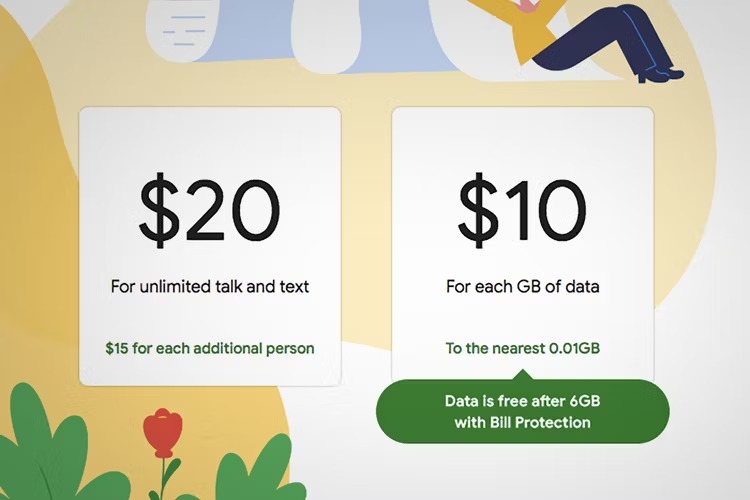
Keep in mind that Google Fi is all about simplifying billing. Therefore, there are no extra costs. Fi has introduced a number of new plans since its launch, and the prices you pay depend on how many lines you want. However, a comprehensive breakdown of the costs associated with the lowest-tier single-line Fi plan can be found as follows:

  • You get unlimited domestic talk and texting, unlimited international texting, and mobile coverage in more than 200 countries for $20 per month.
  • Additionally, you can pay $10 per gigabyte of data until you use 6GB, or $60.
  • After that, your plan’s Bill Protection comes into play. Data is free for the remainder of the monthly billing cycle when that occurs.
  • Your speeds decrease to 256 kbps when you use 15 GB of total data.
  • You can choose to pay $10 per gigabyte for full-speed data after 15GB.
→  52% Of Global Smartphone Shipments Now Come From Chinese Brands, Spells Trouble For Samsung & Apple

To be clear, you only pay for the data you use with the plan, which is free for the rest of the month after you use a certain amount. Additionally, data abroad costs the same as it does at home when traveling internationally.

For a single user, a plan with unlimited data costs $50 per month, up to a 35GB fair usage limit. However, this basic plan only provides a 5GB hotspot allowance and excludes international usage beyond the United States, Canada, and Mexico. However, there is also a $65 “Unlimited Plus” plan that includes 100GB of Google One cloud storage in addition to a fair usage limit of 50 GB.

The monthly price per person goes down for those who want to add more lines. For instance, you pay $18 per user per month for two users and $17 per user per month for three users. You only pay $16 per month per line if you need five or six lines.

You can estimate your Google Fi bill here.

How does Google Fi work?

Sign up for Fi

You must first switch carriers and port your phone number if you already have one from a different carrier service that you want to use. Thankfully, you can sign up for Google Fi online in a matter of minutes, and it takes care of a lot of the work for you. Google will check to see if you can transfer your number when you sign up, but some carriers prohibit it. Typically, the transfer process takes only 15 minutes.

Setting up your device

Next, a specific SIM card is needed for Google Fi. When you sign up for Fi, you can either buy a new phone with this SIM card, or Google will send you a free SIM card to put in your current phone and activate it. Use Google’s checker tool or this comprehensive list of compatible phones to determine whether you can have a phone that is “compatible” with Fi. Fi is compatible with the majority of popular iPhone and Android models, starting with the 5S.

→  How to Activate or Deactivate a Facebook Group, Profile, or Page, Latest Updates

You are fortunate to have a Google Pixel device because you can begin immediately. It has a Fi-compatible integrated eSIM. In essence, an eSIM eliminates the requirement for a physical SIM card, freeing up your SIM slot for use on the network of another carrier if desired.

You can purchase a “designed” for Fi phone directly from Google Fi during sign-up if you do not already own a compatible Fi phone or a Pixel with an eSIM. View the complete list here. If you decide to leave Fi, it will be unlocked and compatible with other carrier networks.

Switching networks

You can begin using your phone as usual once you have signed up for Fi and set it up. Change around. Travel. Due to the three carrier networks that Google Fi uses and Wi-Fi networks, you will be able to text, call, and use data. Fi constantly searches for and connects to reliable Wi-Fi networks by utilizing your phone’s “Wi-Fi assistant.” For your safety, Fi will also route any solid connection through a VPN.

You won’t even notice the difference between, say, T-Mobile and a Wi-Fi hotspot. You won’t have to pay for mobile data anymore, and calls and texts will still work on mobile data. Even when your phone switches between Wi-Fi and carrier networks, you can carry on with your phone call.

One restriction applies: Although most unlocked phones are compatible with Google Fi, they will not be able to switch networks. You won’t have access to Fi’s VPN features because you’ll be using the T-Mobile network most of the time. However, you do get simplified billing, international roaming, and other benefits. Instead of using any unlocked phone that is compatible, we recommend using either a Pixel with eSIM or a phone that has been “designed” for Fi.

International calling

There is no additional cost for data or texting with Google Fi, which is available in over 200 nations. When you’re abroad, calls to any number cost about $0.20 per minute. Tip: calling over Wi-Fi results in lower rates. For the complete list of international rates, visit this link. On Wi-Fi, you can also make free calls back to the US. Until Bill Protection kicks in, data used abroad is charged at the usual rate of $10 per gigabyte.

                       Always be updated with GeeksULTD for real-time updates

LEAVE A REPLY

Please enter your comment!
Please enter your name here

More like this

Xiaomi 14 series: Release Date

Xiaomi 14 Series: Release Date Revealed – Get Ready...

Welcome to our comprehensive guide on the highly anticipated Xiaomi 14 Series! As a leading pioneer in...
OnePlus 12: Release Date

OnePlus 12 Release Date Revealed: Mark Your Calendars for...

Are you eagerly anticipating the next flagship phone from OnePlus? The OnePlus 12 is generating a lot...
Samsung Galaxy S23 FE: Release Date

Samsung Galaxy S23 FE: Release Date Revealed – Mark...

Are you eagerly waiting for the release of the Samsung Galaxy S23 FE? The popular Fan Edition...
New Microsoft Surface foldable: Release Date

New Microsoft Surface Foldable: Release Date Revealed – Exciting...

Are you excited about the latest offering from Microsoft? The new Microsoft Surface foldable device is generating...
Xiaomi Mix Fold 3: Release Date

Xiaomi Mix Fold 3: Release Date Revealed – Get...

Are you eagerly awaiting the launch of Xiaomi's latest foldable phone? Well, the wait is almost over!...