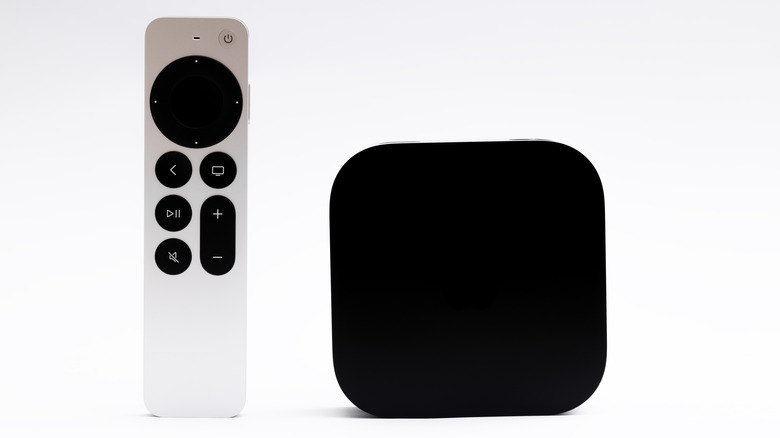
The television remote sits on our coffee tables like a relic from a simpler era—until you try to find the right button to switch from Apple TV to your gaming console. Then it becomes a maddening puzzle of tiny icons and cryptic labels. Apple gave us the Siri Remote: sleek, rechargeable, and missing any obvious way to change HDMI inputs. This design choice has frustrated users since the first aluminum wand shipped. But buried deep within Apple’s settings lies a feature that transforms your mute button into an input-switching command, capable of controlling your entire home theater with a single press.
I’ve spent the better part of a week testing this workaround, and what I discovered challenges our assumptions about interacting with complex entertainment setups. The solution isn’t advertised in any Apple keynote, doesn’t appear in their marketing materials, and requires a setup process that feels more like hacking than configuring. Yet it works—brilliantly, in fact—turning the Apple TV remote into perhaps the most powerful clicker in your living room.
The Missing Button That Wasn’t
Walk into any electronics store and you’ll find remotes bristling with buttons—dozens of them, each promising to simplify your life while actually complicating it further. Apple’s design philosophy has always marched in the opposite direction: remove until you can’t remove anymore. The Siri Remote embodies this ethos, paring down controls to what Apple’s designers deemed essential. But this minimalism created an unexpected friction point. How do you switch from Apple TV to your PlayStation, or from streaming to cable, without hunting for your TV’s factory remote?
The answer, it turns out, was hiding in plain sight. By remapping the mute button through Apple’s “Learn New Device” feature—originally intended for programming third-party remotes—you can assign HDMI input switching to what appears to be the most functionally limited button on the remote. The process requires some digital gymnastics: navigate to Settings → Remotes & Devices → Volume Control → Learn New Device, then when prompted for “mute,” press and hold your TV remote’s input button instead. It’s a setup sequence that feels backwards by design.
What makes this workaround fascinating isn’t just its functionality—it’s what it reveals about Apple’s approach to user experience. The company that famously includes “no manuals” with its products has hidden one of its remote’s most useful features behind a configuration process that few users would intuitively discover. This isn’t accidental; it’s a window into how Apple balances simplicity with capability, hiding complexity for those willing to dig while maintaining surface-level elegance for everyone else.
How the Magic Trick Actually Works

Under the hood, this feature leverages HDMI-CEC (Consumer Electronics Control), a protocol that allows devices connected via HDMI to control each other. Most modern TVs support it, though manufacturers confusingly brand it with proprietary names: Samsung calls it Anynet+, LG dubs it Simplink, Sony labels it Bravia Sync. The protocol enables your Apple TV to turn on your television, adjust its volume, and yes—switch inputs—all through a single cable connection.
The genius of Apple’s implementation lies in its subtlety. Once programmed, a single tap of the mute button cycles through available inputs, while hovering on your desired source automatically selects it. There’s no on-screen menu cluttering your display, no confirmation dialogues to dismiss. It’s input switching reduced to its purest form—almost telepathic in its simplicity. During testing, I found myself switching between Apple TV, Nintendo Switch, and cable box with the casual flick of a thumb, the kind of seamless interaction that makes you wonder why all remotes don’t work this way.
But here’s where the narrative gets complicated: HDMI-CEC implementation varies wildly between TV manufacturers. On my LG OLED, the feature worked flawlessly, cycling through inputs with metronomic precision. On a friend’s budget TCL, the same process introduced noticeable lag and occasionally required multiple attempts. This inconsistency explains Apple’s reluctance to promote the feature—it’s a capability that depends heavily on hardware they don’t control, creating an experience that might frustrate as often as it delights.
Why Apple Hid the Feature in Plain Sight

Apple’s decision to conceal this HDMI-switching capability feels almost mischievous—like a magician who refuses to reveal the trick but leaves enough clues for the curious to discover it themselves. The setup process requires such counterintuitive thinking that most users abandon it halfway through. You must pretend your TV remote’s input button is actually a mute button, effectively lying to your Apple TV so it can learn a new truth. It’s digital subterfuge that would make any spy proud.
But why this elaborate charade? The answer lies in Apple’s broader ecosystem strategy. By making the feature “discoverable” rather than advertised, Apple creates a self-selecting group of power users who become evangelists for the platform’s hidden depths. These users post in forums, create YouTube tutorials, and essentially provide free marketing for Apple’s most sophisticated features. Meanwhile, casual users remain blissfully unaware, happily using their Apple TV without being intimidated by complexity.
This approach also allows Apple to sidestep potential support headaches. If the feature were prominently displayed, the company would field countless calls from users confused about why their mute button suddenly changes inputs on their 2012 off-brand television. By keeping it buried, Apple ensures only the most determined and tech-savvy users will find and implement it—users unlikely to need hand-holding when things go awry.
The Technical Ballet Behind a Single Button Press

What appears to the user as a simple button press actually triggers a remarkably sophisticated chain of electronic communication. When you tap that remapped mute button, your Siri Remote emits an infrared signal that your television interprets as an input-switching command. But here’s where it gets fascinating: the Apple TV doesn’t actually know it’s sending an input-switching signal. It’s been tricked into thinking it’s sending a mute command to a sound system that doesn’t exist.
| Component | What It Thinks Happens | What Actually Happens |
|---|---|---|
| Apple TV | Sending mute command to learned device | Transmitting TV input-switch IR code |
| Television | Receiving input change from TV remote | Receiving input change from Apple TV remote |
| User | Pressing mute button | Triggering HDMI input cycle |
This technical deception works because Apple built remarkable flexibility into their remote’s learning system. The infrared transmitter in the Siri Remote can mimic virtually any IR command, not just volume controls. When you “teach” it the TV’s input button, you’re essentially programming a universal remote without realizing it. The genius lies in Apple’s decision to not limit what commands the remote can learn—only how you access the learning feature.
The feature’s sophistication extends to its timing algorithms. Hold the button too long, and you’ll cycle through inputs too quickly to stop at the right one. Apple engineers clearly spent time calibrating the delay between IR bursts, ensuring users can reliably land on their desired input. This attention to detail suggests the feature wasn’t an afterthought but rather a deliberate, if hidden, design decision.
The Philosophical Divide: Simplicity vs. Capability
This hidden feature embodies a fundamental tension in Apple’s design philosophy. On one side stands the Jobsian ideal of absolute simplicity—devices so intuitive they barely need instruction manuals. On the other lurks the reality that modern home entertainment systems are inherently complex ecosystems of interconnected devices, each with their own quirks and requirements. Apple’s solution? Maintain the illusion of simplicity while secretly empowering those who dig deeper.
Compare this approach to competitors like Logitech’s Harmony remotes, which proudly advertise their ability to control dozens of devices through complex macros and activities. These remotes embrace complexity, turning it into a selling point. Apple instead chooses to hide complexity, making powerful features feel like happy accidents rather than deliberate capabilities.
This philosophy extends beyond remotes. Consider how macOS hides advanced features behind Option-key clicks, or how iOS conceals sophisticated photo editing tools behind seemingly simple adjustment sliders. Apple consistently rewards curiosity while maintaining surface-level simplicity—a approach that creates passionate user advocates while avoiding overwhelming novices.
The Future Hidden in Plain Sight
As I sit here, cycling through HDMI inputs with what appears to be a mute button, I’m struck by how this small discovery reflects larger truths about our relationship with technology. We assume that powerful features must be prominently displayed, that sophistication requires complexity. Yet Apple repeatedly proves that the most elegant solutions often hide in the shadows, waiting for curious minds to uncover them.
This HDMI-switching workaround won’t revolutionize your life, but it represents something more significant: the idea that our devices still contain secrets worth discovering. In an age where every feature is announced in choreographed keynotes and documented in exhaustive wikis, there’s something delightfully analog about stumbling upon a hidden capability through experimentation and curiosity.
The real magic isn’t that you can switch HDMI inputs with your Apple TV remote—it’s that thousands of us will spend hours testing, tweaking, and ultimately mastering these hidden features. We become digital archaeologists, uncovering capabilities that transform our relationship with technology from passive consumption to active exploration. And in that exploration, we rediscover the joy that drew us to technology in the first place: the thrill of making something work better than its designers ever intended, even if they intended it all along.