Many people believe that using a mouse and keyboard is the most effective way to play games on a computer. This combination does provide a plethora of control options, as well as a level of precision that is impossible to achieve with analog sticks in many games. If not, the Xbox Wireless Controller has traditionally been the preferred gaming controller for PC users.
It interfaces seamlessly with Windows and most PC games, ensuring that everything works right out of the box — and it’s also perhaps the most comfortable controller on the market right now. However, if you happen to own a PlayStation 5 (in some capacity) and wish to use the controller that came with it on your PC, you can do so as well.
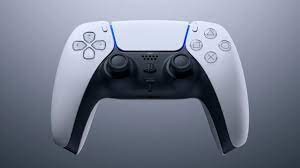
The PlayStation 5 comes with a new DualSense controller, which is a significant improvement over its predecessors in both design and functionality. Because it is slightly more ergonomic than the previous DualShock models, it makes complete sense to use a controller you already own rather than purchasing a new one.
Furthermore, connecting the controller to your PC is a simple process. It is the subsequent setup process that may necessitate a little more effort. What you need to do is as follows:
Connect the PlayStation 5 controller to your computer. There are two methods for connecting the DualSense controller of the PlayStation 5 to your computer.
The simplest method is to simply connect the controller to your computer via the USB Type-C port on the controller and a USB port on your computer. Everything is set as long as you have a cable on hand, which is almost certainly the case.
If you prefer to use a wireless connection, the PlayStation 5 controller also supports Bluetooth, allowing you to connect via that method. The process of connecting a controller in this manner is still rather simple. The procedure is as follows:
Open the Settings app on your PC and navigate to the Bluetooth & devices section (in Windows 11) or the Devices section (in Windows 10) to configure your Bluetooth and other devices (in Windows 10).
Holding down the PlayStation and Share buttons on the PlayStation 5 controller at the same time until the lights around the touchpad turn on will put the controller into pairing mode.
The controller should appear as a Wireless controller on your computer’s desktop. Select it and wait for the connection to be established and completed.
The connection between your controller and your computer has now been established, but the experience is far from smooth from here on out. Windows is built to work solely with one type of input, which is based on the Xbox Wireless Controller, and as a result, the Xbox Wireless Controller is the only type of input that most games support out of the box. Fortunately, there are workable solutions for this.

Configuring your controller for use with Steam. When it comes to gaming on PC, Steam is the most popular platform, and one of the amazing things about it is that it adds support for a variety of controllers that Windows doesn’t handle very well out of the box. There are several such controllers, and the PlayStation 5 DualSense is one of them. You can easily configure it using Steam’s configuration tool.
That also implies that you will most likely be able to utilize the controller with the majority of your games, as Steam has an extremely large catalog of titles. This is true even for games that are not developed by Steam. If you haven’t already, you can get Steam by clicking here.
For more latest updates visit here geeksultd.com